

Your customer fills in a form
Having the customer fill in their part at home — with a request per appointment, or as an intake asked by itself after their first booking — and what your customer sees of it.
A section the customer fills in does not have to be done at the visit. You can ask the customer to do it at home, in the customer portal, so that your colleague knows on arrival where the boiler is, what the complaints are or which medication someone takes. This guide explains how to ask, what the customer sees, and how the intake works: the one form Schedulinq sends to a new customer by itself after a booking.
Three ways
For every form with a section for the customer you choose under Usage → Customer fills in how it is filled in:

| Choice | Who sets it off | Where the customer fills in |
|---|---|---|
| Together at the visit | Nobody: your colleague fills it in, together with the customer | On your colleague's device |
| At home, when you send it | A colleague, per appointment, with Send request | In the customer portal |
| At home, asked automatically | Schedulinq, after a new customer's first booking — for an intake only | In the customer portal |
Why only an intake goes out by itself is in How forms work. You build the form itself like any other — see Build a form.
Sending a request
With Customer fills in on At home, when you send it, the form is simply on the appointment, and the customer's part waits until you ask for it.
Open the form on the appointment
Through the Forms card on the appointment. The customer's part says Customer fills in · not asked yet.
Choose Actions → Send request
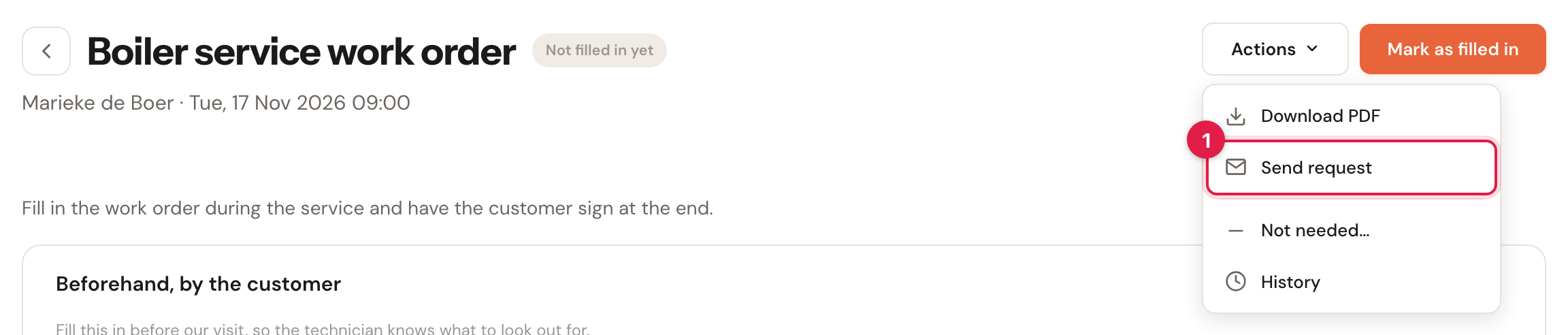
If it cannot be sent, the item is greyed out with the reason under it: the customer has no e-mail address, we cannot send to this e-mail address, the customer is archived, or the form has already been signed.
Confirm
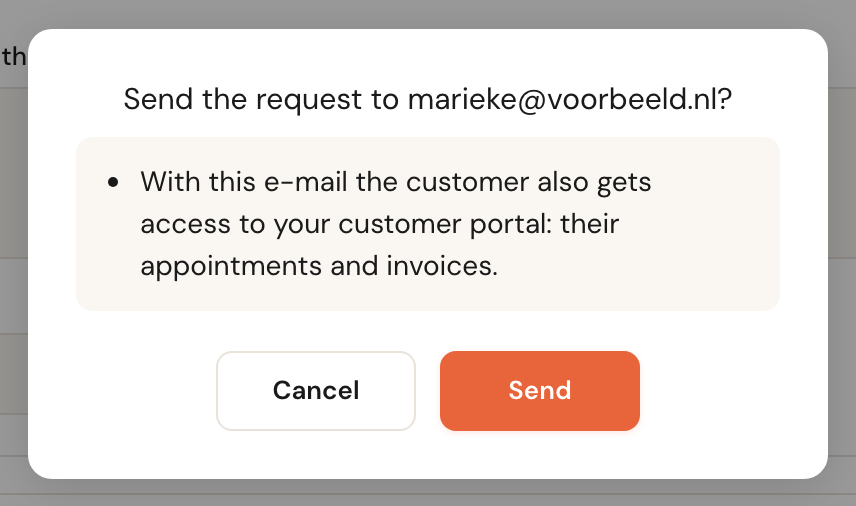
The question names the e-mail address. If the customer has no access to the customer portal yet, it adds that they get it with this e-mail. After Send, Schedulinq says Request sent to ….
If no e-mail goes out, because there is no e-mail to the customer under Communication for Form requested, the form says so in as many words: Not sent: no e-mail message is set up for 'Form requested'., with the link Set up the message. Schedulinq never says "sent" when nothing was sent.
A request covers one form at one appointment. If the customer has three appointments with a questionnaire each, you send three requests. A form without an appointment — one you add on the customer themselves, with + Form in their notes — is requested the same way; it just has no due date.
Sending again or withdrawing
As long as the customer has not sent their part, Actions holds:
- Send request again — the customer gets a new e-mail; the reminders of the first request are cancelled and start again.
- Withdraw request — the customer can no longer fill in the form. Anything they filled in but did not send stays with them; you do not see it.
What the customer sees
The customer gets an e-mail with a button to the form. It takes them to the customer portal, where they log in with a code by e-mail — they need no password. There:
- a notice at the top shows while a form is waiting for them;
- the form is in the Forms tab, under To do, with Fill it in before … — the date of the appointment;
- they only see the sections they must fill in. What your colleague fills in they do not see, unless you share the form with the customer and it is filled in;
- what they type is saved by itself, even if they stop halfway and continue later;
- they click Send when they are done. If a required answer is missing, the portal says which.
After sending, the form is under Sent. Until the appointment the customer can still change it with Change — You can change your answers until …. After that, or once the form is signed, it says Need to change something? Contact …. When the form is done, it is under Completed, with Download PDF.
More about the portal itself is in What your customer sees.
While you wait for the customer
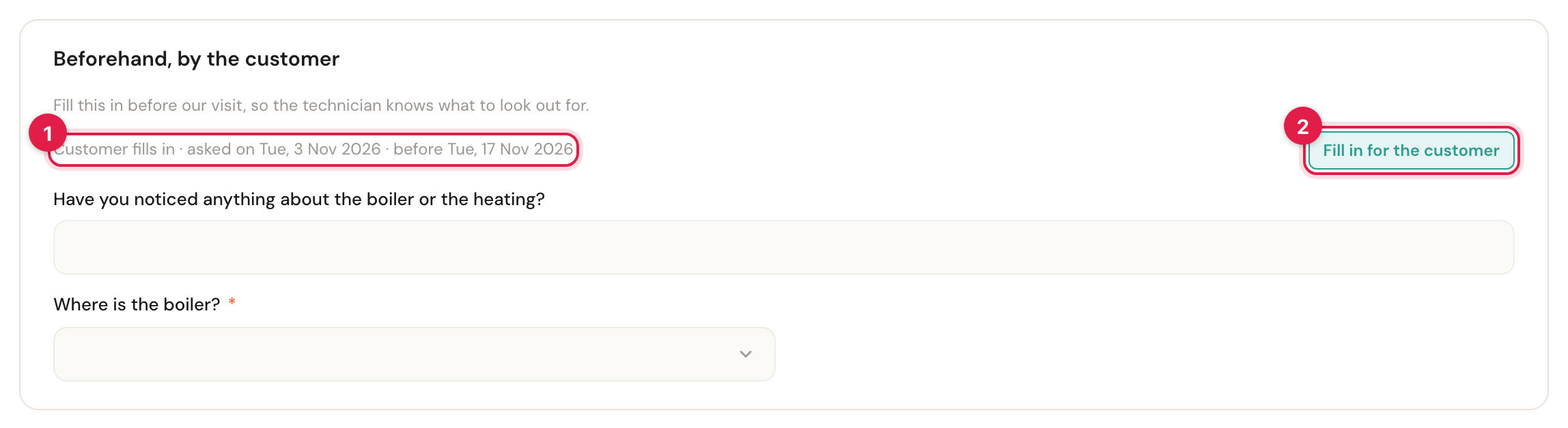
- The section says where the request stands: asked on …, before … (the appointment), in progress once the customer has started, or needs sending again if the invitation no longer works — for example because the customer's e-mail address changed. Then Send again appears beside it.
- Fill in for the customer — the section is the customer's while the request runs. If they call and would rather tell you, click this and fill it in yourself.
If the customer has started but not sent it yet, Schedulinq asks first: The customer has started this but not sent it yet. Open it anyway? This is recorded.
On the appointment the form says Customer: asked on … · not filled in yet. Once your team's part is done, the form gets the Waiting for customer badge. In the calendar such a form gets no clipboard: there is nothing for your team to do.
When the customer sends their part, it says Sent by the customer on …. If you want to be told, add a message to your organisation in the Form flow at When the customer sends the form.
The intake
An intake is a form the customer fills in once, not at every appointment: a getting-to-know-you questionnaire, a medical anamnesis, the details of their home. It belongs to the customer, not to an appointment, and has only sections the customer fills in.
Setting up an intake
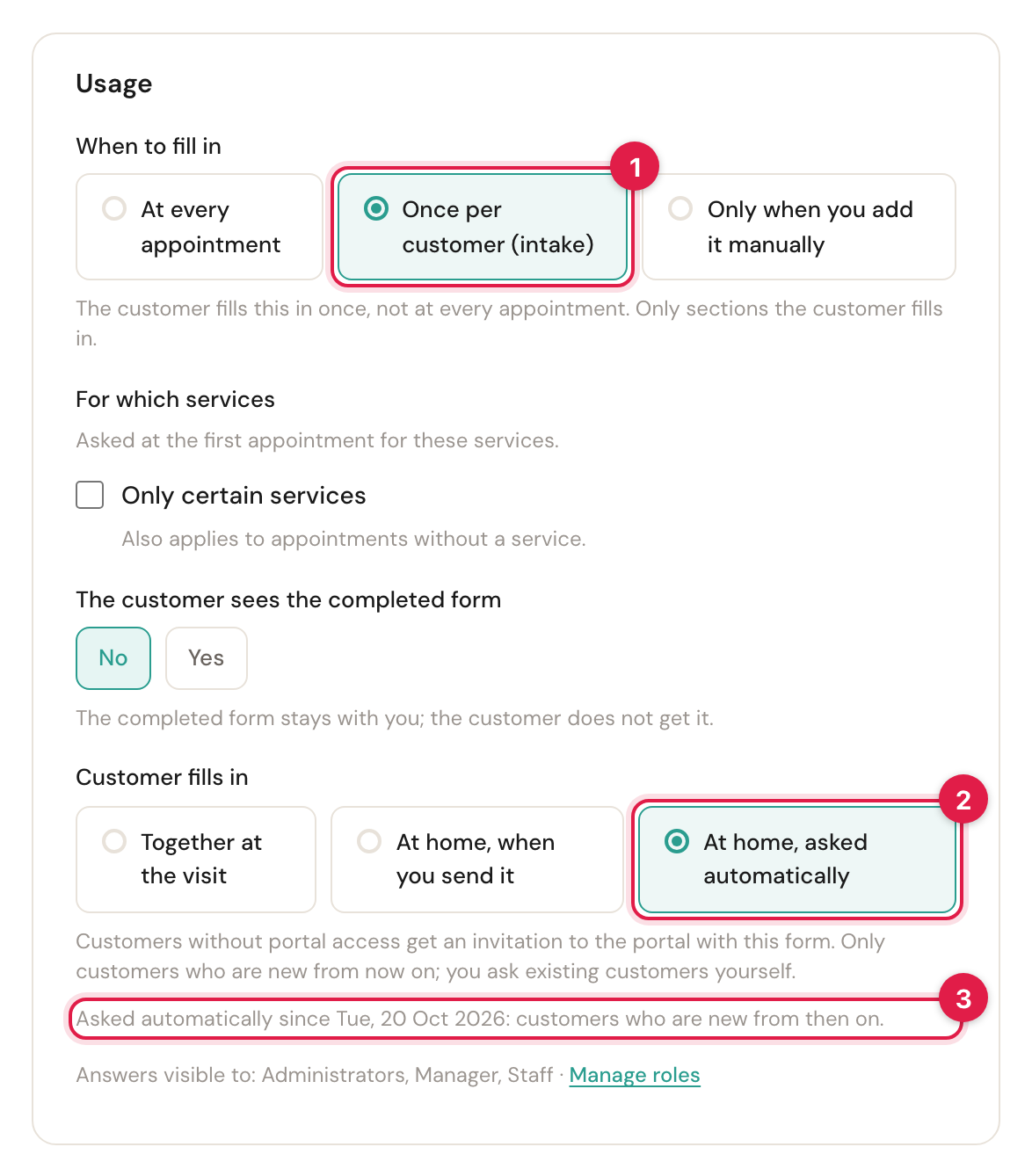
- When to fill in on Once per customer (intake). All sections are then the customer's; a signature or Required to complete the appointment does not exist for an intake.
- Customer fills in: Together at the visit, At home, when you send it (with Send intake on the customer) or At home, asked automatically.
- Asked automatically since … — the day you switched automatic asking on.
For an intake, For which services only decides which bookings ask for it automatically: an intake for an Intake meeting need not come along with a one-off repair.
Who gets it automatically
With the intake on At home, asked automatically, Schedulinq asks a customer for it when:
- the customer is new: created on or after the day in Asked automatically since. Existing customers do not get it by themselves — you ask them yourself, see below;
- the customer gets an upcoming appointment for one of the chosen services — booked on the booking page, in the portal, through an invitation or a subscription, or made by you in the dashboard. An appointment from a connected calendar or from Teamleader asks nothing;
- the customer never got this intake before. An intake they filled in, that was withdrawn or marked as not needed also counts: they do not get it again by itself.
The customer gets the intake by e-mail straight after the booking, with access to the customer portal if they did not have it yet. The due date is their next appointment, and moves along when that changes. If one booking asks for two intakes, the customer gets one e-mail for both.
When you switch At home, asked automatically on, Schedulinq says on saving: New customers get this intake with their first appointment. You ask existing customers yourself, from the customer list with 'Intake: not asked'. Switch it off and on again later, or restore an archived intake, and Asked automatically since starts again.
The intake on the customer
A customer's page has an Intake card, with where each intake stands.
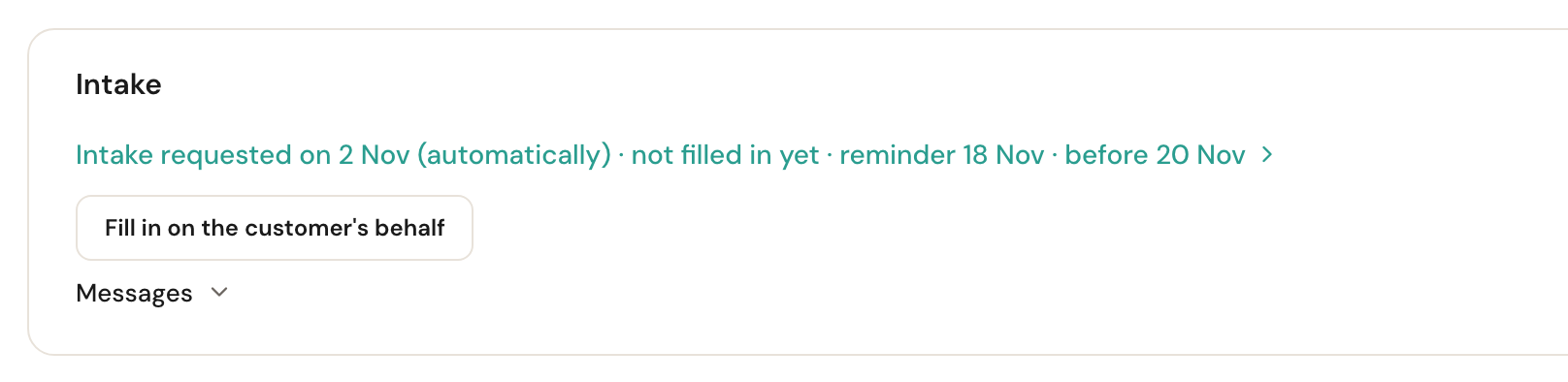
A few of the lines you may see:
| Line | Meaning |
|---|---|
| Not asked yet: this happens at the first appointment | A new customer without an appointment. |
| Not asked automatically: the customer existed before the intake | An existing customer: ask them yourself. |
| Intake requested on … (automatically) | With not filled in yet or in progress, the next reminder and the due date. Click it to open the intake. |
| Not sent: no e-mail message is set up for 'Form requested'. | Set up the message with Set up the message. |
| No e-mail address: fill in the intake together with the customer | Schedulinq could not e-mail. |
| Completed on … | Done. The filled-in form is also in the customer's notes. |
Under the line are the buttons that apply now: Send intake, Send intake again or Request a new intake; Fill in on the customer's behalf to fill it in yourself, and Continue filling in if you had already started. Under Messages you see which e-mails were sent about the intake. Withdrawing is done on the intake itself, with Actions → Withdraw request; a withdrawn intake lapses and is not asked again by itself.
Sending the intake to an existing customer
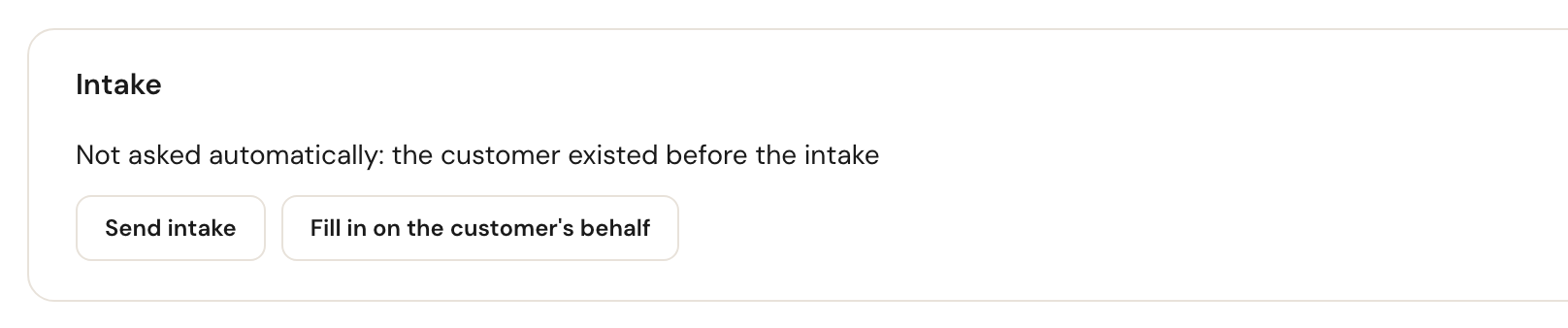
Click Send intake on the card, or choose it in the customer's Actions menu:
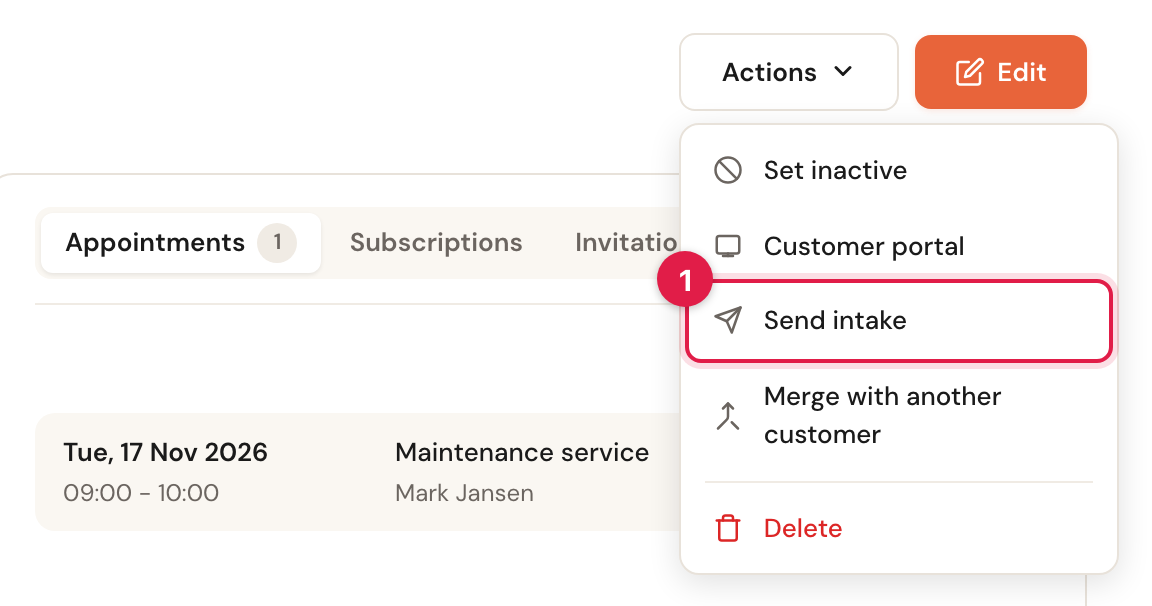
Schedulinq asks Send "New customer intake" to …? and, if the customer has no access yet, that they get it with this e-mail. If you have several intakes, the menu item is called Send intake… and you choose which one first.
To see all your existing customers who have no intake yet, open Customers and choose the filter Intake: not asked. Intake: open shows who still has to fill it in, Intake: completed who is done. The Intake column, which you switch on yourself, shows per customer Waiting for customer, Open, Completed with the date, or Not needed. See The customer overview.
Archiving an intake
If you archive an intake form, the intakes nobody has filled in yet lapse, and customers get no more reminders for them. Completed and started intakes are kept. If you restore it later, the intake is only asked automatically of customers who are new from then on.
If you merge two customers who both had an open intake, the merged customer keeps one.
Frequently asked questions
Can I send a questionnaire automatically at every appointment? No, only an intake goes out by itself. A questionnaire per appointment is sent with Send request.
The customer says they got no e-mail. Check the form's Messages to see whether the e-mail was sent, and to which address. If the address is wrong, correct it on the customer and choose Send request again.
Does the customer see my technician's answers? Only if you share the form with the customer, and only once it is completely filled in. Otherwise they only see their own part.
Can the customer still change their answers? Until the appointment, with Change in the portal, as long as the form is not signed. After that your team changes it.
A customer without an e-mail address? Then no request or intake can go by e-mail. Fill it in together, with Fill in for the customer.