

Skills
Let the answer to a question decide which colleague does the appointment — and see straight away when someone is scheduled who doesn't fit it.
Not every engineer can do every job. A Mitsubishi heat pump needs someone who knows that brand, F-gas work needs a certified colleague, and a customer who would rather speak German is best sent to the one colleague who can. With skills you let the answer to a question decide who does the appointment.
That is something else than the Service finder: that helps the customer choose which service they need. Skills are about who carries that service out. They have no effect on duration or price.
How it works
You link colleagues to the answers of a question you already ask.
- Which questions. A custom field of a customer, an appointment or an object, of the type Select, Multi-select or Yes / no. A text field cannot do this: it has no fixed set of answers to link colleagues to. Staff member fields can't either; they describe the colleague themselves.
- Who belongs to an answer. Per answer you pick colleagues, or a job: then everyone with that job belongs to it, including people who join later. An answer you link nobody to fits everyone.
- What the answer does. Every question has a setting:
| Setting | What happens |
|---|---|
| Off | The answer does not decide who does the appointment. |
| Required | Only colleagues who belong to the answer get the appointment. If nobody fits, there is no time to book. |
| Preferred | If more colleagues are free at the same time, someone who belongs to the answer gets the appointment. The times don't change. |
If an appointment asks several questions, a colleague has to fit every answer that decides something. For Multi-select with several answers ticked, one colleague has to be able to do all of them.
Linking colleagues to a question
You set it up on the question itself, under Company → Custom fields. Open the field and go to the Link staff members tab. For an object type the same question is also on the type's page, with a Chooses the staff member column in the table; see Customer objects.
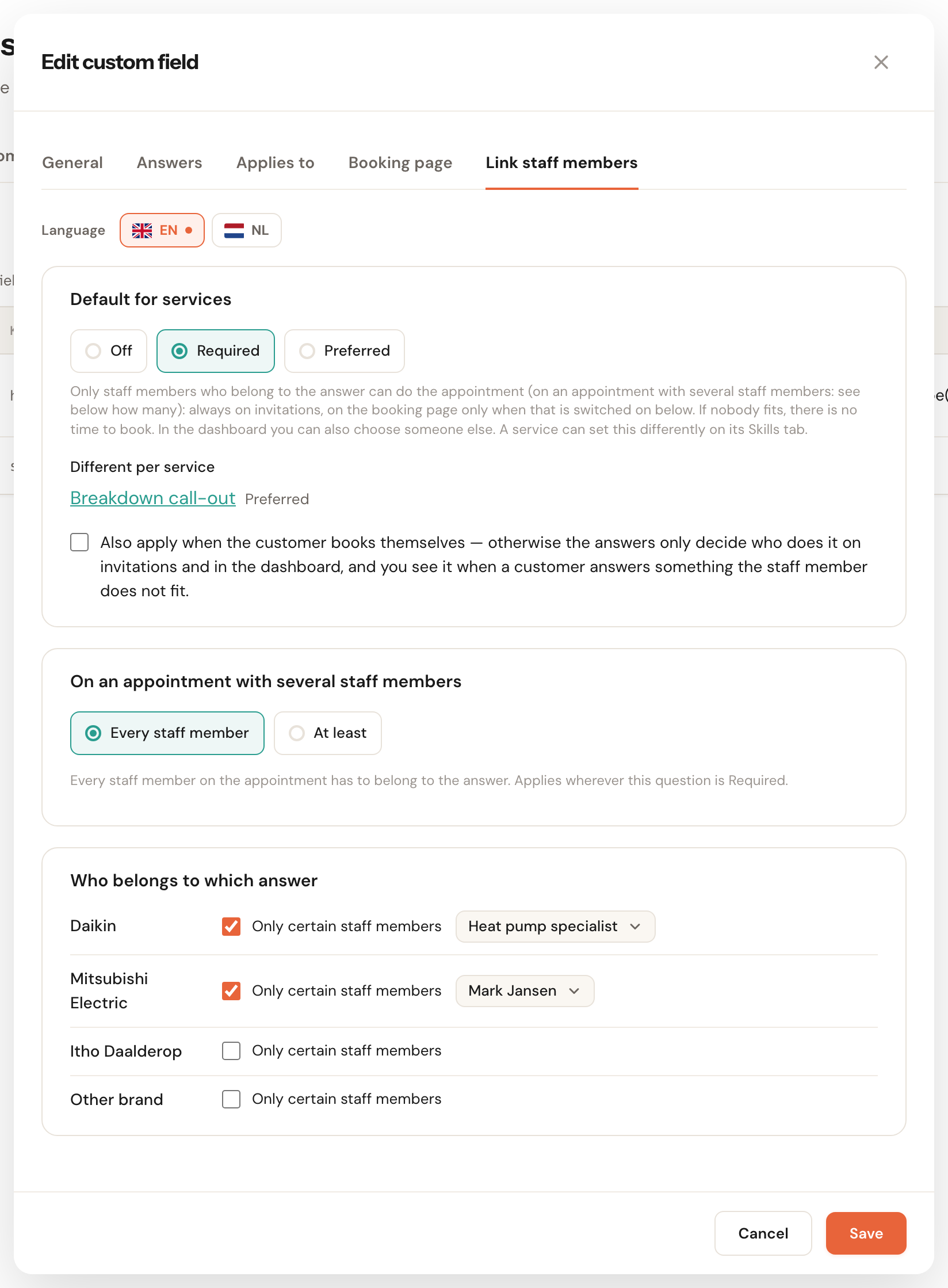
Default for services
Default: OffOff, Required or Preferred — the setting for every service that asks this question and sets nothing else itself.
The same question can matter for one service and not for another. The heat pump's brand counts for maintenance, but on a breakdown anyone may take a first look. That is why a service can differ on its own Skills tab; under Different per service you see which services do, with a link to that tab. Set the default to Off and the links per answer are kept, so a service can still switch the question on.
Also apply when the customer books themselves
Default: offLet the answer a customer gives on the booking page choose the colleague too.
With this off, the answer only chooses the colleague on invitations, in the customer portal and in your own dashboard. On the booking page the customer then gets the times of everyone who does the service, and you see afterwards when their answer doesn't fit the colleague scheduled. Switch it on for questions a customer answers well, such as their preferred language. Leave it off for questions customers often get wrong, such as the type of heat pump. Every question starts with this choice off, including questions you already had.
On an appointment with several staff members
Required onlyDefault: Every staff memberEvery staff member or At least a number (1 to 20) of the colleagues on an appointment has to belong to the answer.
An installation with two people often needs one certified engineer, while the second may be an apprentice. At least 1 allows that. If one colleague has to be able to do two things at once, link only the people who can do both to that answer: two questions with At least 1 each are also satisfied by two different colleagues. An appointment with one colleague is never relaxed by this: that one always has to fit. The minimum only counts on an invitation for several staff members (and a subscription's invitations); on an appointment you make yourself, you pick the colleagues yourself.
Who belongs to which answer
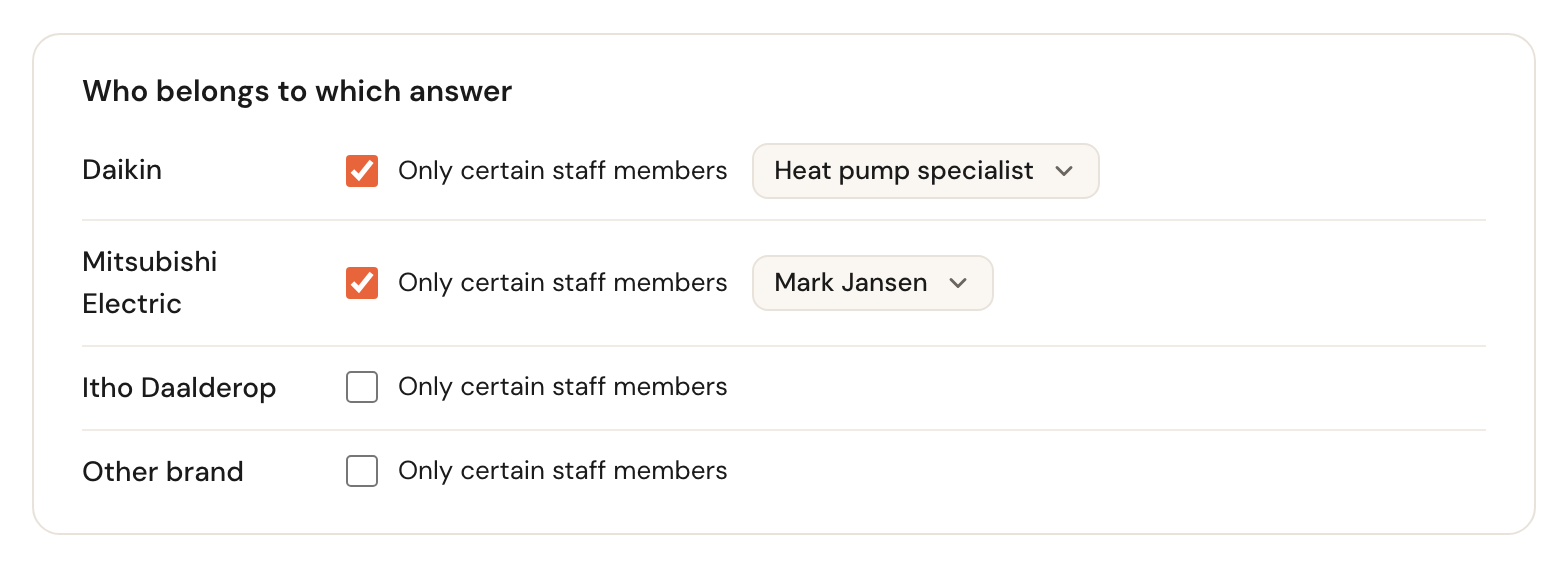
Per answer: tick Only certain staff members and pick who. Leave it unticked for an answer everyone fits.
Unticked means everyone, including colleagues who join later. An answer with a tick but no colleagues is not possible: Schedulinq asks Pick at least one job or staff member, or untick ‘Only certain staff members’. Pick only colleagues who cannot be scheduled right now and the field warns None of these staff members can be scheduled right now., but you can still save.
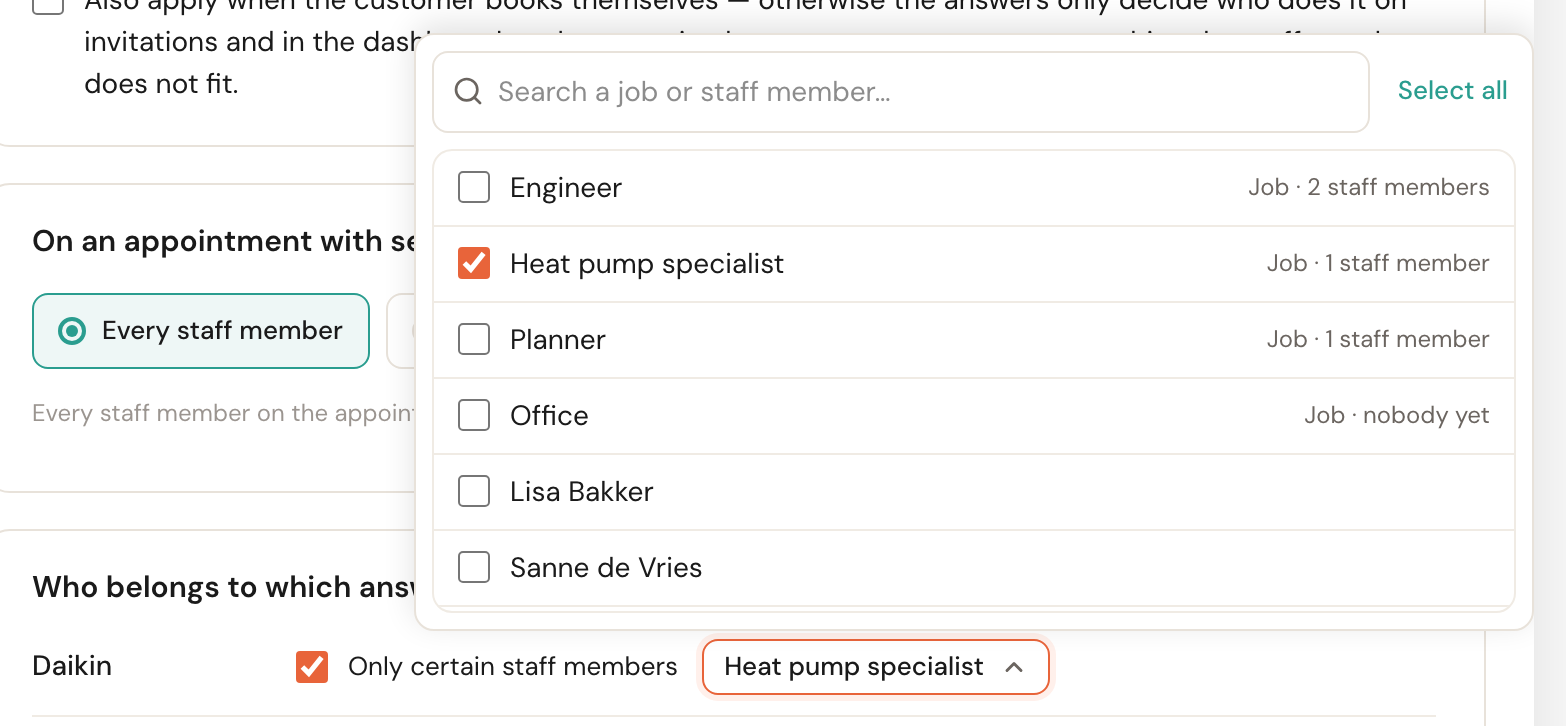
The picker lists the jobs first, with how many colleagues hold them, then the colleagues themselves.
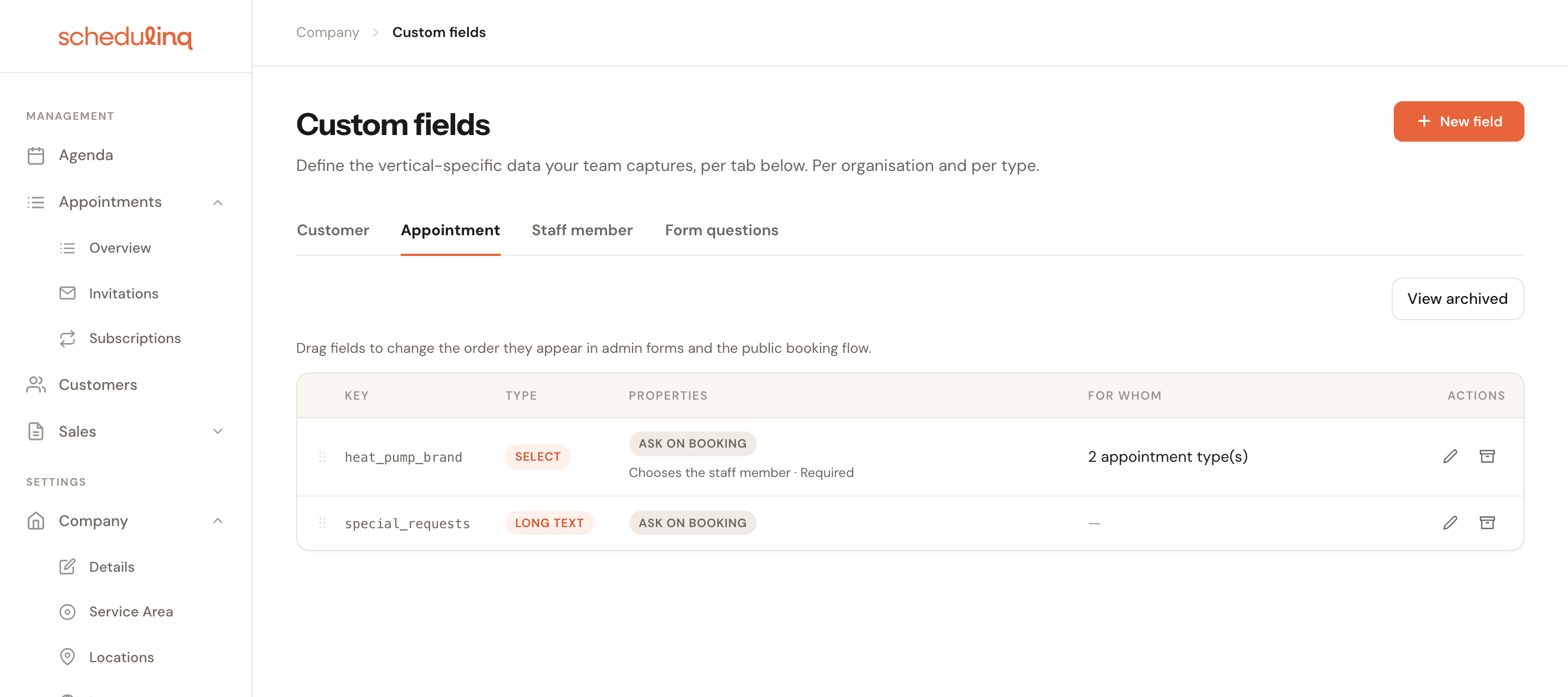
In the list under Custom fields you can tell that a question chooses the colleague: Chooses the staff member · Required (with · at least 1 if you chose a minimum), or Chooses the staff member · Preferred. When Also apply when the customer books themselves is on, also when customers book themselves follows.
Archive such a question and the confirmation says that it will no longer decide who does the appointment.
Per service: the Skills tab
A service's page (Services → Appointment types) has a Skills tab with every question that can choose the colleague for this service: the service's own questions, those of the objects the service accepts, and the customer fields.
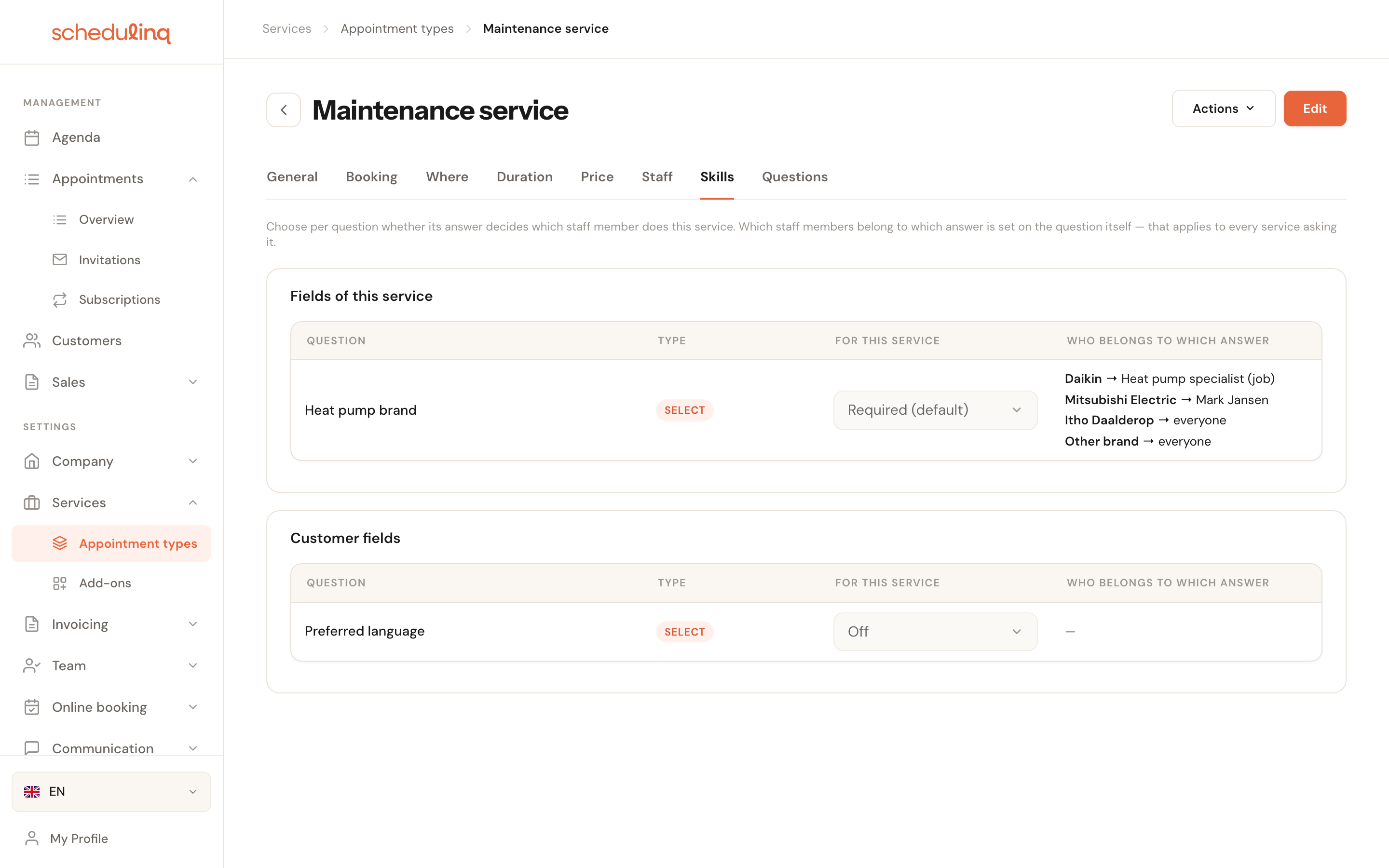
In the For this service column you choose Off, Required or Preferred per question; the setting with (default) after it follows the question. Who belongs to which answer shows who belongs to each answer, but you change that on the question itself, because it applies to every service that asks it. What else is on a service's page is in Create an appointment type.
On a colleague's profile
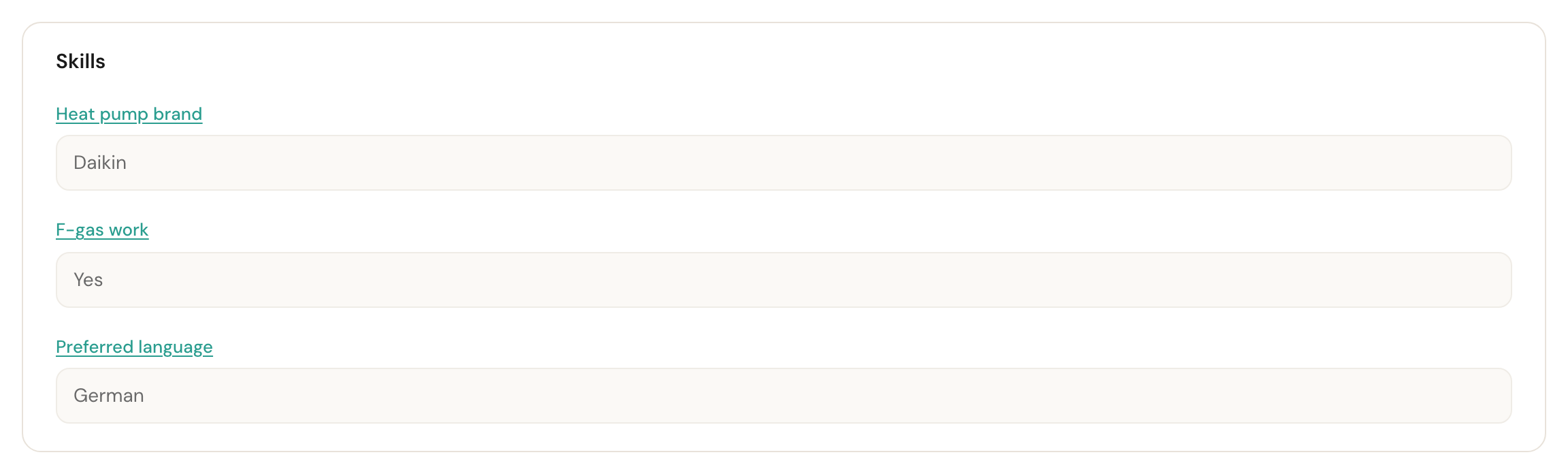
A colleague's page has a Skills card: which answers that colleague belongs to, directly or through a job. You can't change anything here. Anyone who may edit the settings can click a question's name to open that question's Link staff members tab straight away. If someone belongs to nothing, there is no card.
Who may choose the colleague
Every answer is stored. Whether it also chooses the colleague depends on where it came from:
| Where the answer comes from | Does it choose the colleague? |
|---|---|
| You, in the dashboard — creating an appointment, several appointments, an invitation, a subscription, Find appointment options | Yes, visibly, and you may overrule it. |
| An invitation — the answers you filled in beforehand, and what is stored on the customer or the object | Yes, and the customer can no longer change them. |
| The customer portal — what is stored on the customer or the object | Yes, whatever Also apply when the customer books themselves says. |
| The customer types it themselves — on the booking page, or in the portal for a question nothing is stored for yet | Only when Also apply when the customer books themselves is on. |
| Reschedule, or moving an appointment with the same colleague | Never: the customer keeps who they had. |
In the dashboard: visible, and you decide
On the forms for an appointment, invitation or subscription the list of colleagues adapts as soon as you answer the questions. For a required question, Only show people who fit the answers sits above the list, ticked. Untick it and you see everyone, with Does not fit the answers next to those who don't. You may pick anyone; Schedulinq refuses nothing. For a preferred question the colleagues who fit are listed first with Fits the answers, without a filter.
If the customer has no object yet, for instance when installing a new heat pump, you can still answer the object type's questions on the form, right above the colleagues: Not on record for this customer yet. What you fill in here decides who can do the appointment. No object is created from it yet.
On an invitation: what you fill in is fixed
Fill in an answer on an invitation and the booking page no longer asks for it. The customer sees it under Filled in by and your company's name, and cannot change it. So that answer always chooses the colleague. A question you left empty is answered by the customer; that answer only counts when Also apply when the customer books themselves is on.
If an invitation can never be booked like this, the form says so under the colleagues: The customer cannot book this invitation as it is: with the reason, for example that none of the allowed staff members fits the answers on Heat pump brand, or that whatever the customer answers, none of them fits. It is a warning: you can always save. See Who fits the answers.
On the booking page
With Also apply when the customer books themselves on, the customer only gets the times of colleagues who fit their answer. If nobody fits, they see the same as when nobody does the service. If you have Book elsewhere switched on and a colleague who fits does the service at one of your locations, the booking page offers that location. How you word those pages yourself is in No times are available.
When the colleague doesn't fit
When an answer doesn't choose the colleague, because the customer booked themselves or because you picked someone else, Schedulinq checks it afterwards. If the colleague doesn't fit the answer to a required question:
- the appointment says under the colleagues, for example, Mark Jansen does not match the answers: Heat pump brand = Daikin., with the Change staff member button;
- the appointment gets an amber mark in the agenda;
- you can switch on the Does not match answers column in the appointments overview (not sortable);
- you can put it in a message to your own team with the variable Does not match the answers. In an email to your organisation it reads Note: Mark Jansen does not match Heat pump brand = Daikin., and the appointment's details card gains a row Does not match the answers.
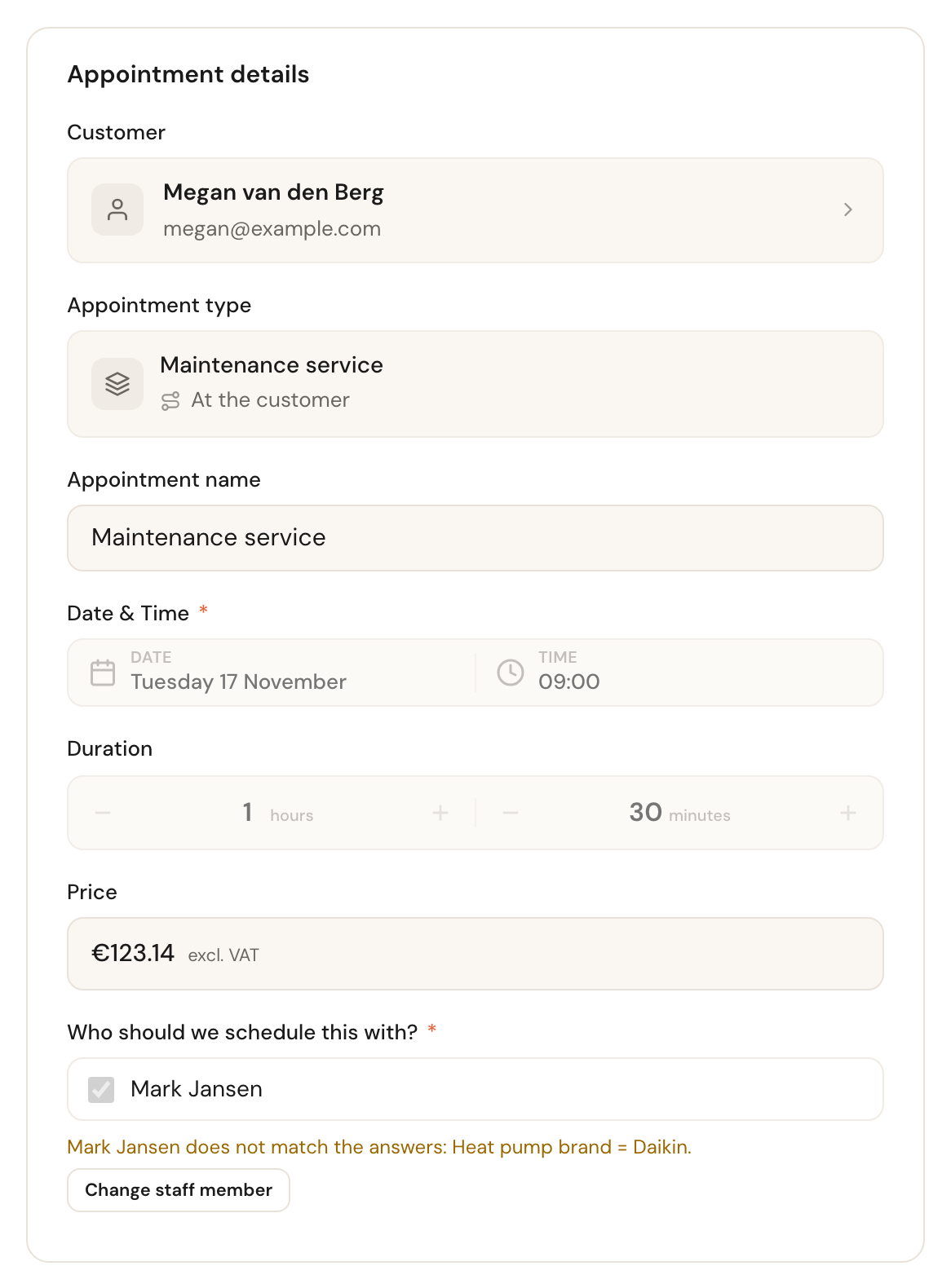
What to do with such an appointment is under Does not match the answers on the appointment page.
A preference is never checked: it excludes nobody. Schedulinq checks again when the appointment is created, changed or moved, and when the customer's or the object's answers change. Change who belongs to an answer and Schedulinq only checks again on the appointment's next change. On a cancelled appointment the warning disappears.
Messages you may come across
| Message | What is going on |
|---|---|
| One of the chosen jobs no longer exists or has been archived. | You linked a job that has been archived since. Pick another, or restore the job. |
| One of the chosen staff members no longer exists or has been archived. | The same for a colleague. A colleague who was already linked and was removed later is kept: if they come back, they belong to the same answers again. |
| Staff members are linked to an option that no longer exists. Check the options. | An answer has been taken out of the question in the meantime. |
| Choose a number from 1 to 20. | The minimum for several staff members is out of bounds. |
| This question does not apply to this service (any more). | On a service's Skills tab: the question no longer applies to that service, or has been archived. Reload the page. |
What is not possible (yet)
- Service areas don't take answers into account, and an invitation already ignores service areas. So a colleague outside the customer's area gives no warning on an invitation.
- Find appointment options only asks the first service's questions.
- In the customer portal a customer cannot book for a particular object yet; there the answers stored on the customer themselves count.
- Duration and price never depend on an answer.
Frequently asked questions
A customer booked with the wrong engineer. Check that the question is set to Required and whether Also apply when the customer books themselves is on. If it is off, their answer doesn't choose the colleague, and you see the appointment with the amber warning. Change the colleague on the appointment, or switch the choice on if customers answer this question reliably.
Suddenly there are no times. With a required question there is no time when nobody fits the answer, or when whoever fits has no working hours. Check on the service's Skills tab who belongs to which answer.
I want one colleague who can do two things. Two questions count separately. If you want one person who can do both, link only the colleagues who can do both to the one answer.
Does this work for an object too, such as the customer's heat pump? Yes. The answer stored on the object counts for every appointment for that object, as long as the object belongs to that customer. How to create object questions is in Customer objects.